Introduction
Querying JSON in VCF Operations Orchestrator and VMware Aria Automation Orchestrator often starts simple.
Find an object by name.
Select an item from an array.
Read a property somewhere below the root.
For small structures, a few property accesses or loops are usually enough. But infrastructure data rarely stays simple. Configuration models, API responses, deployment metadata, and inventory data quickly become deeply nested structures where the condition you are looking for may exist several levels below the object you actually want to return.
Readers familiar with Java or C# may recognize a familiar programming model here. At a conceptual level, JSONPath has similarities to Java Streams or C# LINQ: instead of explicitly implementing iteration and condition handling, you describe which data should be selected and projected. The APIs and capabilities are different, but the underlying declarative way of thinking is similar.
At this point, the traversal logic often starts to dominate the code.
Nested loops, temporary arrays, existence checks, and multiple levels of if statements describe how to walk through the object structure instead of what should be selected.
This is the problem I wanted to solve with an extended JSONPath implementation for VCF Operations Orchestrator and Aria Automation Orchestrator.
The idea is simple:
Instead of manually traversing an object structure, describe the selection as a declarative query and let the query engine navigate the structure.
Standard JSONPath already provides a powerful foundation for navigating and filtering JSON. But for some real-world automation scenarios I wanted to go one step further.
What if a query could find a deeply nested object and then traverse back to its parent?
What if that parent could be filtered again before continuing further up the structure?
And what if the complete operation could still be expressed as one readable query pipeline?
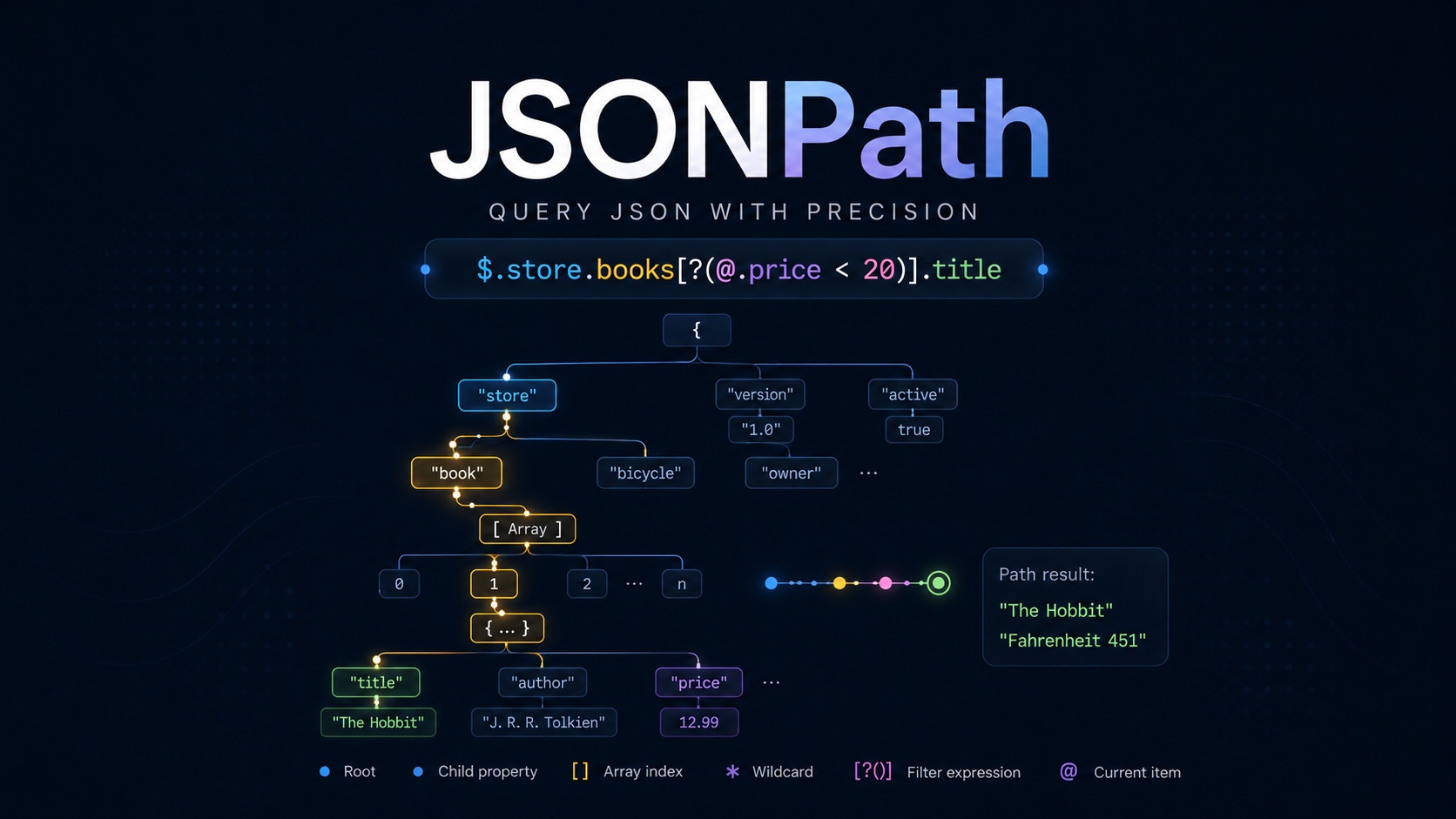
This turns JSONPath from a simple value selector into something that feels much closer to querying an object graph.
The result is a dependency-free JSONPath Action designed for VCF/Aria Orchestrator. It keeps RFC 9535 as the default query language while providing an optional extended mode with two additional concepts: a self-filter and parent traversal.
Together, these extensions make both top-down and bottom-up queries possible without falling back to nested imperative loops.
The complete implementation, documentation, and test suite are available on GitHub.
This article does not try to reproduce the complete JSONPath reference or the project README. The goal is to show the problem with imperative object traversal, introduce the declarative query model, and demonstrate how nested filters, self-filtering, and parent traversal can make complex Orchestrator data structures significantly easier to query.
A Real-World Deployment Example
Consider a very simplified response returned by the VCF Automation deployment API.
{
  "content": [
    {
      "name": "vm0006",
      "inputs": {
        "env": "dev",
        "image": "Alma 10",
        "software": "None"
      },
      "resources": [
        {
          "name": "VM",
          "type": "Cloud.vSphere.Machine",
          "properties": {
            "powerState": "OFF",
            "resourceName": "vm0006"
          }
        },
        {
          "name": "Network",
          "type": "Cloud.vSphere.Network",
          "properties": {
            "resourceName": "net0002"
          }
        }
      ]
    },
    {
      "name": "vm0004",
      "inputs": {
        "env": "dev",
        "image": "Windows Server 2022",
        "software": "SQL"
      },
      "resources": [
        {
          "name": "HDD[0]",
          "type": "Cloud.vSphere.Disk",
          "properties": {
            "resourceName": "vm0004 HDD1 D"
          }
        },
        {
          "name": "VM",
          "type": "Cloud.vSphere.Machine",
          "properties": {
            "powerState": "ON",
            "resourceName": "vm0004"
          }
        },
        {
          "name": "Network",
          "type": "Cloud.vSphere.Network",
          "properties": {
            "resourceName": "net0003"
          }
        }
      ]
    }
  ]
}The response contains multiple deployments. Each deployment contains its own input data and a list of resources such as virtual machines, disks, and networks.
For this example, we want to answer a simple question:
Which deployment contains a vSphere disk resource and was created using the Windows Server 2022 image?
The interesting part is that the two conditions are located at different levels of the object structure.
The image belongs to the deployment:
deployment.inputs.imageThe resource type belongs to an entry inside the nested resources array:
deployment.resources[*].typeA traditional implementation therefore has to iterate over the deployments, inspect their resources, identify matching disk resources, and then continue working with the deployment that owns those resources.
var result = [];

for (var i = 0; i < deployments.content.length; i++) {
    var deployment = deployments.content[i];

    if (deployment.inputs.image !== "Windows Server 2022") {
        continue;
    }

    for (var j = 0; j < deployment.resources.length; j++) {
        var resource = deployment.resources[j];

        if (resource.type === "Cloud.vSphere.Disk") {
            result.push(deployment.name);
            break;
        }
    }
}

return result; // returns ["vm0004"]There is nothing wrong with this implementation. For one condition and two levels, the code is still manageable.
The Same Query with RFC 9535
The same selection can already be expressed much more directly with standard RFC 9535 JSONPath.
In this case, the outer filter operates on deployments, while the nested filter checks whether the current deployment contains at least one Cloud.vSphere.Disk resource.
$.content[?
    @.inputs.image == 'Windows Server 2022' &&
    @.resources[?@.type == 'Cloud.vSphere.Disk']
].nameBoth implementations return the same result. The difference is not what they do, but how the selection is expressed.
For this example, standard JSONPath is enough. No extension is required.
The complete syntax reference, supported query modes, examples, extension semantics, and testing information are documented in the GitHub repository
Standard JSONPath expressions can also be tested interactively at jsonpath.com
When Top-Down Queries Become More Complex
For the previous example, standard JSONPath provides a clean solution because
the query naturally starts with the deployment that we ultimately want to
return.
The deployment is filtered by its own properties, while nested filters inspect
the resources below it.
This works very well as long as the query can be expressed naturally from the
top down.
Infrastructure data, however, is not always queried that way.
Sometimes the easiest object to identify is located several levels below the
object we actually want to return.
For example, we may first identify a specific resource and then need to continue
with the deployment that owns it.
Conceptually, the traversal direction changes:
deployment
    ↓
resources
    ↓
matching resource
but the desired result is:
matching resource
    ↑
deployment
Standard JSONPath is primarily designed for selecting nodes while traversing away from the root. Once a deeply nested node has been selected, there is no RFC 9535 operator for navigating back to its parent.
Parent Traversal with ^
The first extension addresses exactly this limitation.
The ^ operator moves one normalized path level toward the root.
For example:
$.content[*].resources[?(@.type == 'Cloud.vSphere.Disk')]^This query first selects matching disk resources and then moves one level up.
An important detail is that arrays are part of the path as well. A resource is
an element of the resources array, so one parent step reaches the array itself,
not the deployment.
To reach the deployment, two parent steps are required:
$.content[*].resources[?(@.type == 'Cloud.vSphere.Disk')]^^Conceptually:
Cloud.vSphere.Disk resource
        ↑
resources array
        ↑
deployment
The ^ parent operator follows the syntax introduced by JSONPath Plus. It is
available in the extended query modes of this implementation.
Filtering the Current Node with ??
At this point we can navigate back to the owning deployment.
But there is still one problem.
A regular JSONPath filter evaluates the elements or member values of the current container. After moving back to the deployment, however, we want to evaluate the deployment node itself.
This is what the self-filter ??(...) is for.
The self-filter evaluates the current node instead of iterating over its
children.
For example:
$.content[*][??(@.inputs.image == 'Windows Server 2022')].nameHere, @ represents the deployment itself.
The query therefore keeps only deployments whose inputs.image property isWindows Server 2022.
Result:
["vm0004"]The distinction between the two filter types is important:
?(…) evaluates the elements or member values of the current container
??(…) evaluates the current node itself
The ??(...) self-filter is a project-specific extension provided by this
implementation.
Combining ^ and ??
Individually, both extensions solve a small navigation problem.
The parent operator ^ lets us move upward in the object structure, while the
self-filter ??(...) lets us evaluate the node we have reached.
Combined, they allow us to express the previous example from the opposite
direction.
Instead of starting with the deployment and looking down into its resources, we
can first find the resource we are interested in and then work our way back to
the deployment.
$.content[*].resources[?(@.type == 'Cloud.vSphere.Disk')]^^[??(@.inputs.image == 'Windows Server 2022')].nameThe query can be read as a pipeline:
$.content[*]
    ↓
.resources[?(@.type == 'Cloud.vSphere.Disk')]
    ↓
^^
    ↓
[??(@.inputs.image == 'Windows Server 2022')]
    ↓
.name
Step by step:
- Start with all deployments.
- Inspect their resources and select
Cloud.vSphere.Diskresources. - Move two path levels upward: from the resource to the
resourcesarray and
from there to the owning deployment. - Apply the self-filter to the deployment itself.
- Keep only deployments using the
Windows Server 2022image. - Return the deployment name.
Result:
["vm0004"]Conceptually, the traversal now looks like this:
deployment
    │
    └── resources
          │
          └── matching disk
                  ↑
                  │ ^
              resources
                  ↑
                  │ ^
              deployment
                  │
                  ?? image == "Windows Server 2022"
                  │
                .name
This is what makes the combination interesting: the query does not have to
begin with the object that will eventually be returned.
It can identify a deeply nested node first, move back to its owning context,
filter that context, and continue from there.
For this particular example, the earlier RFC 9535 query is still the simpler
solution because the selection can naturally be expressed from the deployment
downward.
The bottom-up version is not intended to replace nested filters.
Its advantage becomes more apparent when the most natural starting point of a
query is located deep inside the object structure, especially when multiple
parent and self-filter steps need to be composed.
The extended operators can also reduce query complexity. Instead of expressing a deeply nested condition from the root downward, a query can start at the most specific node, traverse back to the relevant ancestor with ^, and apply additional conditions there with ??(...).
Using It in VCF/Aria Orchestrator
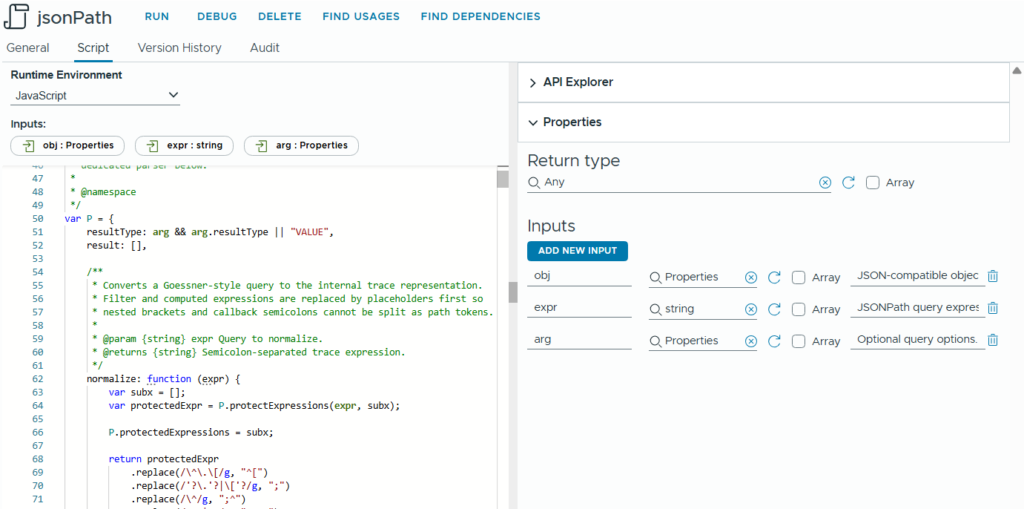
The implementation is provided as a single dependency-free Orchestrator Action.
Create an Action named jsonPath and use the contents of jsonPath.js from the GitHub repository as the Action body.
The Action expects three inputs:
obj– the JSON-compatible object to queryexpr– the JSONPath expressionarg– optional query setting
Supported properties:
mode: “RFC9535” | “RFC9535_EXTENDED” | “GOESSNER_EXTENDED”
resultType: “VALUE” | “PATH”
allowUnsafeEval: true | false
Example:
{ mode: “RFC9535_EXTENDED”, resultType: “VALUE” }
Defaults:
mode = “RFC9535”
resultType = “VALUE”
allowUnsafeEval = false
A typical call from a workflow looks like this:
// Retrieve the deployments via the REST API and parse the response
// Replace com.example.jsonpath with the module containing your jsonPath
var matches = System.getModule("com.example.jsonpath").jsonPath(
    deployments,
    "$.content[?(@.inputs.image == 'Windows Server 2022')].name"
);RFC 9535 is the default query mode.
RFC 9535 and value results are the defaults, so no options are required for standard queries. The extended mode is enabled explicitly only when features such as parent traversal or self-filtering are needed.
var matches = System.getModule("com.example.jsonpath").jsonPath(
    deployments,
    "$.content[*].resources[?(@.type == 'Cloud.vSphere.Disk')]^^[??(@.inputs.image == 'Windows Server 2022')].name",
    {
        mode: "RFC9535_EXTENDED"
    }
);This keeps standard RFC 9535 queries as the default while making parent
traversal and self-filtering available when they are actually needed.
Supported modes:
- RFC9535:
- Standard RFC 9535 behavior
- RFC9535_EXTENDED:
- RFC 9535 + ^ + ??
- GOESSNER_EXTENDED:
- Compatibility mode for historical Goessner-style queries
RFC 9535 is the built-in default, so standard queries do not require an arg parameter. The default mode can also be changed directly in the Action source by adjusting the jsonPathMode fallback (currently around line 3138 in jsonPath.js).
var jsonPathMode = arg && arg.mode || "RFC9535";In larger environments, the default does not have to be hard-coded. It can instead be supplied dynamically through an Orchestrator Configuration Item. This makes it possible to define an environment-wide default while still allowing individual calls to override it through arg.mode.
Compatibility and Origins
This implementation did not start from scratch.
Its historical basis is Stefan Goessner’s JSONPath 0.9.0 implementation from
2007, which has been used in many JavaScript environments for years.
The default query mode, however, follows the modern RFC 9535 JSONPath
specification.
The extended modes add two concepts used throughout this article:
^– parent traversal, following the operator introduced by JSONPath Plus??(...)– a self-filter specific to this implementation
JSONPath Plus is not a runtime dependency. The parent operator was adopted as a useful extension to the query model, while the self-filter was added to make it possible to evaluate the current node after navigating upward.
This separation is intentional. Existing environments can preserve historical
query behavior where necessary, while new queries can use RFC 9535 as the
default.
Conclusion
Imperative traversal is not inherently wrong. For small object structures, a
few loops and conditions are often the simplest solution.
The problem starts when the traversal logic becomes more complex than the
business rule it is supposed to express.
Standard JSONPath already provides a strong declarative model for navigating
and filtering JSON structures from the top down. In many cases, including the
deployment example shown earlier, RFC 9535 is all that is needed.
The extended query model adds another direction when the natural starting point of a query is located deeper in the object structure.
The ^ parent operator makes it possible to navigate back toward an owning
object, while the ??(...) self-filter makes it possible to evaluate the node
reached during that traversal.
Together, they allow queries to be composed as declarative bottom-up pipelines
instead of reconstructing the same relationships with nested loops, temporary
variables, and repeated property checks.
The goal is not to replace imperative code everywhere.
It is to keep object traversal from dominating automation logic and to make the
selection itself visible in one place.
For VCF/Aria Orchestrator, where deeply nested API responses, deployment data, configuration structures, and inventory objects are common, that can make a significant difference in how readable and reusable automation code becomes.
The complete implementation, supported syntax, query modes, examples, and test suite are available in the GitHub repository.
AI Disclosure
The JSONPath implementation discussed in this article was generated entirely using AI based on RFC 9535 and requirements and design decisions provided by the author. Project-specific tests were also AI-generated, while RFC 9535 compliance is additionally verified using the independent JSONPath Compliance Test Suite.
AI was also used to assist with writing and editing this article. The final content was reviewed by the author.